Small business receipts, sorted

Scan a receipt. Text Detection (OCR) reads it. It lands in your own Google Sheets spreadsheet.

Point your phone at any paper receipt. SpeedReceipt detects the merchant, date and total, then logs the line straight into your own Google Sheets spreadsheet — no retyping, no shoebox of paper.

It's a simple way to get your receipts stored digitally and their details entered into a spreadsheet, ready for your accountant to work from. Built for sole traders, freelancers and other small operators who handle their own books — it doesn't manage payroll or per-employee expenses, so it's not the right fit once you employ staff.

Free to try. Works in your browser or as an app on Android, with Windows, iPhone and Mac on the way.
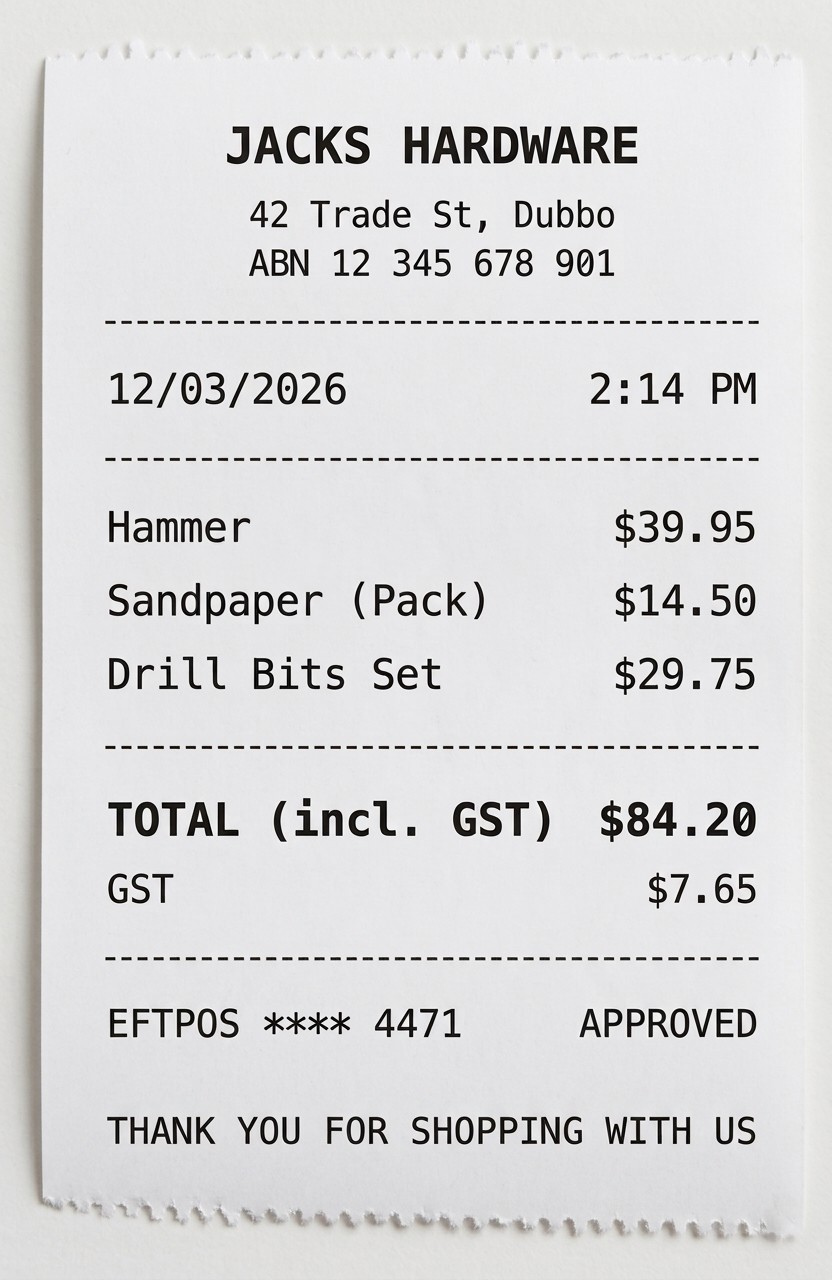
Example paper receipt from Jacks Hardware
Saved
MerchantJacks Hardware
Date12/03/2026
ItemsHammer, Sandpaper, Drill Bits
CategoryTools
Tax (GST)$7.65
Total$84.20
Synced to your Google Sheets spreadsheet

Example, shown for illustration

What's on the receipt

Everything a paper receipt costs you, automated

SpeedReceipt handles the scanning, the reading, and the filing — you keep the ten minutes you'd otherwise spend typing it all in by hand.

01

Scan with your phone's camera

Point your camera at any paper receipt. On-device Text Detection (also known as OCR) reads the merchant, date, and price the moment you take the photo.

✓ included
02

Import the receipts you've already got

Got a folder of receipt photos or PDFs sitting on your device already? Import them one at a time or the whole folder in one go — no rescanning needed.

✓ included
03

Forward them straight from your email

Every account gets its own forwarding address, or set up an auto-forwarding filter in Gmail — emailed receipts and invoices land in your account with no scanning at all.

✓ included
04

Google Sheets spreadsheet sync

Every receipt is logged as its own row in your own Google Sheets spreadsheet — the one you already own, not a system you have to export from later.

✓ included
05

Receipt Assistant

Learns which category and items you usually pick for each merchant, and offers them back next time — without ever guessing at something the receipt doesn't actually say.

✓ included
06

One account, every platform

Sign in once and you're covered on Android, the web app, and Windows today — iPhone and Mac unlock the same way the moment they ship. No separate purchase per device.

✓ included
07

Tax calculated automatically

Worked out from the total the moment it's scanned, including after any deductions — you can always correct it by hand. Rename it to GST, VAT, sales tax or whatever your region calls it, and dates follow your own date format too.

✓ included
08

Invoices and quotes, done properly

Raise a proper PDF invoice or quote for a customer — auto-numbered, with your own GST setup applied — straight from the same app your receipts already live in. Email it to the customer on the spot, or download it.

✓ included
09

Mileage logbook

Track business kilometres as you drive, ready for your logbook at tax time.

✓ included
Also included: Multi-currency Custom categories Business-use % splitting Custom themes Cashbook export Wi‑Fi scanner & printer support Try it in demo mode, no sign-in needed

Ready for tax time

A real cashbook, not a shoebox of receipts

Pick your financial year and SpeedReceipt turns everything you've logged into a proper cashbook spreadsheet — twelve monthly tabs plus a Summary, income and expenses split out by category, running totals, and an optional GST/tax summary. It's laid out the way an accountant-supplied template already is, because that's exactly what it's modelled on.

Download it as an Excel spreadsheet or open the live Google Sheets version, then get it to your accountant the same way you'd share any other spreadsheet — attach it to an email, or just send them the link.

ABCDEF
1
2Financial Year: FY2025-26
3Name: Jack's Hardware Pty Ltd
4
5Speedy, effortless receipt bookkeeping for small business.
6
7
8DateAmountQuantityGST
9Jul1,240.0022 boxes112.73
10Aug980.5016 hours89.14
11Sep1,450.7530 each131.89
12Total3,671.25333.76
13
14
15DateToolsFuelOffice SuppliesQuantityGST
16Jul95.00140.0060.0026.82
17Aug107.50152.5072.5030.23
18Sep120.00165.0085.0033.64
19Total322.50457.50217.5090.69
20
212,673.75
Jul Aug Sep Oct Nov Dec Summary +
ABCDEFGH
1
2Financial Year: FY2025-26
3Name: Jack's Hardware Pty Ltd
4
5Speedy, effortless receipt bookkeeping for small business.
6
7
8DateMerchant - ItemsAmountQuantityGSTNotes
93 Jul420.001 batch38.18
109 Jul390.501 batch35.50
1115 Jul429.501 batch39.05
12Total1,240.00112.73
13
14
15DateMerchant - ItemsToolsFuelOffice SuppliesQuantityGSTNotes
163 Jul95.001 each8.64
179 Jul140.0065 L12.73
1815 Jul60.003 reams5.45
19Total95.00140.0060.0026.82
20
21945.00
Jul Aug Sep Oct Nov Dec Summary +

Example, shown for illustration

Your data, your Drive

It's your Spreadsheet. We just help you fill it in.

Every receipt, every spreadsheet row, every cashbook export lives in your own personal Google Drive and Sheets — the account you already have, not a database SpeedReceipt runs. Your receipts and financial data are never stored on our servers. The only thing tied to your account elsewhere is whether you're subscribed, so your one account works across every device without your records ever leaving Google.

How it works

Three steps, no spreadsheet gymnastics

STEP 01

Scan

Photograph or upload the receipt. Text Detection (OCR) reads it on the spot.

STEP 02

Check

Merchant, date, price and category are pre-filled — glance over them, fix anything, tap Save.

STEP 03

Synced

The receipt is added as a row in your own Google Sheets spreadsheet, ready for tax time.

Get SpeedReceipt

Use it in your browser today, or install the app

The web app works right now on any device. Native apps are rolling out platform by platform.

Google Play Android
App Store iPhone — coming soon
Windows Coming soon
Mac Coming soon